Current week is not displayed when chart data is grouped by week
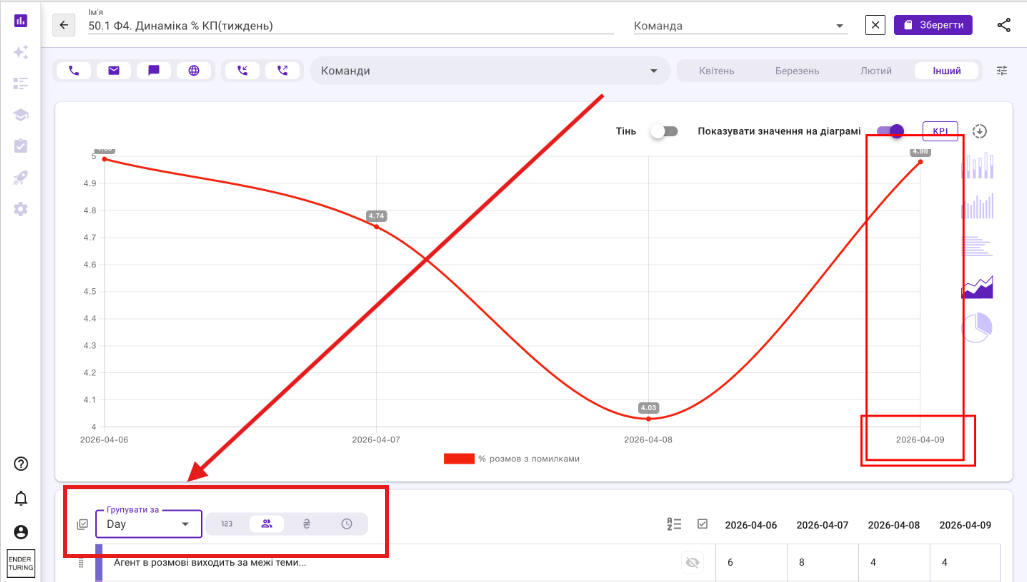
When chart data is grouped by day, the chart includes data for the current day even though the day is not yet complete.
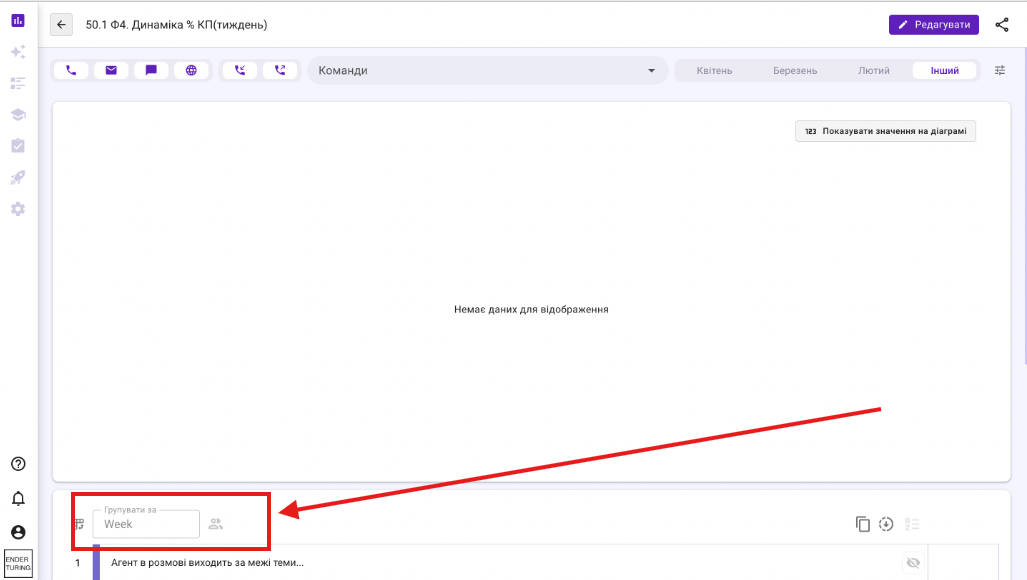
However, when the same data is grouped by week, the current incomplete week is excluded. As a result, users can only view data for the previous completed week.
The grouping behavior should be consistent: the current week should be displayed with all available data collected from the beginning of the week up to the current moment.
Current Behavior
When grouping by day, the current incomplete day is displayed.
When grouping by week, the current incomplete week is not displayed.
The latest available period in the chart is the previous completed week.
Expected Behavior
When data is grouped by week, the chart should include the current calendar week, even if it has not yet ended.
The current week should contain all available data from the beginning of the week up to the current date and time.
Acceptance Criteria
Select a date range that includes the current week.
Group the chart data by week.
Verify that the current week is displayed as the latest period.
Verify that the current week contains all available data collected from the beginning of the week up to the current moment.
The current week must not be excluded because it is incomplete.
Existing filters and timezone settings must also be applied to the current week.
Completed previous weeks must continue to be displayed without changes.
Pic 1 - chart grouped by day
Pic 2 - chart grouped by current week is not working
Log in to comment and vote
No comments yet
Be the first to share your thoughts.